 All Threads
 General
 Television
 Blu-rays/DVDs/Films
 Hardware
 PCs & Mobiles
 Photography
 Music
Music Gaming & Consoles
 Sports
 Bargain Buckets
 Region Hacks
 Trading
 Retailer Reviews


Multi-region hack for Hitachi DV-P305e
This hack page was originally hosted on DVD Reviewer, it was automatically imported by a not-very-clever script and may contain formatting errors and inaccuracies, sorry!
How to convert your Hitachi DV-P305e player into a multi-region compatible machine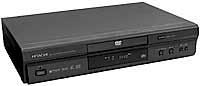
This hack also works on the Thomson DTH-3600, DTH-4000, DTH-4200 and DTH-4500 models, along with the Samsung DVD-709, DVD-809, DVD-909, DVD-511, DVD-611, DVD-811, M105 and Hitachi DV-P305e and DV-P515e
On various Samsung models this hack will also disable Macrovision, but you have to turn off the Quasi-PAL option and set the SCART output type to Video rather than RGB.
Always try and perform a Cold Start before applying the hack below
1. Power on your player
2. Press and hold both the Play and Stop buttons on the player
3. After a short while you should be presented with a set of language options. Release the Play and Stop buttons on the player
4. In some cases you may now need to turn your player off and then back on
5. You will now need to select a language option between 1 and 6
To convert this player to Multi-Region playback
1. Press the Repeat button on your remote control
NB: If the above does not work and your model supports it, press both Repeat buttons at the same time, or alternatively press the Subtitle button
2. Using your remote control enter the code below, note that you must know what Region your player is currently set to in order to know which code is appropriate
for Region 1 use 2, 9, 3, 3 and 4
for Region 2 use 3, 8, 7, 6 and 7
for Region 3 use 5, 6, 7, 3 and 2
for Region 4 use 7, 6, 8, 8 and 4
for Region 5 use 5, 3, 8, 1 and 4
for Region 6 use 2, 4, 4, 6 and 2
3. A code should be displayed on the screen indicating the current Region setting of your unit.
4. Press the 9 button on your remote control for Region free, or 1 for Region 1, 2 for Region 2 and so on.
5. Press the Open button on your player
6. Press the Standby button on your remote control
If the player sticks on FBI Warning screens
1. Press Forward Search x2 or faster, the disc should skip straight to the main featuer