 All Threads
 General
 Television
 Blu-rays/DVDs/Films
 Hardware
 PCs & Mobiles
 Photography
 Music
Music Gaming & Consoles
 Sports
 Bargain Buckets
 Region Hacks
 Trading
 Retailer Reviews


Multi-region hack for Cyrus DVD-7
This hack page was originally hosted on DVD Reviewer, it was automatically imported by a not-very-clever script and may contain formatting errors and inaccuracies, sorry!
How to convert your Cyrus DVD-7 player into a multi-region compatible machine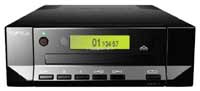
To change the current region setting on this player
1. Press the Play button on the remote control
2. Press the buttons 2, 5, and 6 on the remote control, in order, one at a time
3. The display should now show "..........."
4. Using the remote control, enter the code 222 222 005 255. Note that the last digit will not show on the display.
5. Press the Play button on the remote control
To reset this player to its factory defaults
1. Press the Play button on the remote control
2. Press the buttons 2, 7, and 4 on the remote control, in order, one at a time
3. The display should now show "..........."
4. Using the remote control, enter the code 004 000 000 000. Note that the last digit will not show on the display.
5. Press the Play button on the remote control

RE: Multi-region hack for Cyrus DVD-7
Hi, does it also work with the cyrus dvd8 in the same way.?

You might have to just try it, most hacks that were found to work on other machines were because people just tried it!
Editor
MYREVIEWER.COM
My Flickr Photostream